
Clocks keep the different blocks of a digital design in step with each other. A Verilog clock generator for simulation is a block of code that toggles a signal with a chosen period, duty cycle and phase, using delays. It is a testbench model, not synthesizable hardware: on a real chip, clocks come from oscillators, PLLs and clock dividers.
12 min read | Beginner Level
What You'll Learn
- The three properties of a clock: period, duty cycle and phase
- Generate simple clocks in a testbench with
alwaysand delays - Build a parameterized clock generator with frequency, phase, duty cycle and an enable
- How
`timescaleprecision affects generated clock periods
Properties of a clock
A clock is described by three properties: its frequency, which sets its period; its duty cycle; and its phase relative to other clocks.
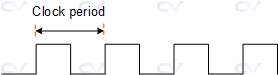
Clock Period
The frequency of a clock is the number of cycles it completes per second, and the period is the time one cycle takes. They are reciprocals: period = 1 / frequency. A 100 MHz clock has a period of 10 ns, and a 400 MHz clock a period of 2.5 ns.
Clock Duty Cycle
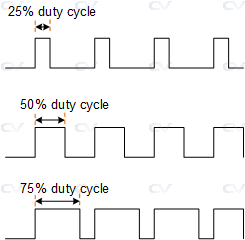
The duty cycle is the fraction of the period during which the clock is high. A 50% duty cycle clock is high for half the period and low for the other half. A 10 ns clock with a 25% duty cycle is high for 2.5 ns and low for 7.5 ns.
Clock Phase
Phase describes how far one clock is shifted in time relative to another clock with the same period. One full period is treated as 360 degrees, so a clock shifted by a quarter of its period is 90 degrees out of phase, and one shifted by half a period is 180 degrees out of phase, which is the same as its inverse for a 50% duty cycle.

| Phase | Shift (fraction of period) | Shift for a 10 ns clock |
|---|---|---|
| 0 degrees | 0 | 0 ns |
| 90 degrees | 1/4 | 2.5 ns |
| 180 degrees | 1/2 | 5 ns |
| 270 degrees | 3/4 | 7.5 ns |
Simple Clock Generation
Most testbenches need just one or two plain 50% duty cycle clocks. These are generated by toggling a reg after every half period:
`timescale 1ns/1ps

module tb;
  reg clk;

  // Style 1: initialize, then toggle every half period
  initial clk = 0;
  always #5 clk = ~clk;              // 10 ns period, 100 MHz

  // Style 2: the same clock in a single initial block
  // initial begin
  //   clk = 0;
  //   forever #5 clk = ~clk;
  // end
endmodule
The delay is the half period, so a 10 ns clock uses #5. See Verilog Timescale for how the delay units are set.
Verilog Clock Generator
When a testbench needs several clocks with different frequencies, phases or duty cycles, a reusable module is more convenient than separate always blocks. The module below takes three parameters:
FREQ- Frequency in kHzPHASE- Phase shift in degreesDUTY- Duty cycle in percent
An enable input starts and stops the clock. When several clock generators share the same enable, they all start from the same moment, which makes their phase relationships easy to control.
Delays in simulation are limited by the precision of the `timescale directive. With `timescale 1ns/1ps, every delay is rounded to the nearest picosecond. A 640000 kHz (640 MHz) clock has a period of exactly 1.5625 ns, which cannot be represented with 1 ps precision, so the generated clock is slightly off frequency. For such clocks, use a finer precision, such as `timescale 1ns/100fs.
`timescale 1ns/1ps

module clock_gen (	input      enable,
  					output reg clk);

  parameter FREQ = 100000;  // in kHZ
  parameter PHASE = 0; 		// in degrees
  parameter DUTY = 50;  	// in percentage

  // Real arithmetic: 1.0 forces floating point, so no precision is lost to integer division
  real clk_pd  		= 1.0/(FREQ * 1e3) * 1e9; 	// convert to ns
  real clk_on  		= DUTY/100.0 * clk_pd;
  real clk_off 		= (100.0 - DUTY)/100.0 * clk_pd;
  real quarter 		= clk_pd/4;
  real start_dly     = quarter * PHASE/90;

  reg start_clk;

  initial begin
    $display("FREQ      = %0d kHz", FREQ);
    $display("PHASE     = %0d deg", PHASE);
    $display("DUTY      = %0d %%",  DUTY);

    $display("PERIOD    = %0.3f ns", clk_pd);
    $display("CLK_ON    = %0.3f ns", clk_on);
    $display("CLK_OFF   = %0.3f ns", clk_off);
    $display("QUARTER   = %0.3f ns", quarter);
    $display("START_DLY = %0.3f ns", start_dly);
  end

  // Initialize variables to zero
  initial begin
    clk <= 0;
    start_clk <= 0;
  end

  // When clock is enabled, delay driving the clock to one in order
  // to achieve the phase effect. start_dly is configured to the
  // correct delay for the configured phase. When enable is 0,
  // allow enough time to complete the current clock period
  always @ (posedge enable or negedge enable) begin
    if (enable) begin
      #(start_dly) start_clk = 1;
    end else begin
      #(start_dly) start_clk = 0;
    end
  end

  // Achieve duty cycle by a skewed clock on/off time and let this
  // run as long as the clocks are turned on.
  always @(posedge start_clk) begin
    if (start_clk) begin
      	clk = 1;

      	while (start_clk) begin
      		#(clk_on)  clk = 0;
    		#(clk_off) clk = 1;
        end

      	clk = 0;
    end
  end
endmodule
How the module works:
- Timing values: the period is computed in ns from
FREQ, then split into on and off times byDUTY. The phase delay is the quarter period scaled byPHASE / 90, so 90 degrees gives one quarter period. - Phase: when
enablerises,start_clkgoes high only afterstart_dly, so the clock starts late by exactly its phase shift. - Duty cycle: the
whileloop drives the clock high forclk_onand low forclk_offon each pass. - Stopping:
start_clkis checked once per period, so whenenablefalls, the clock finishes its current period before stopping, without a shortened pulse.
Synthesis result: None. This module uses # delays and real variables, which synthesis tools ignore or reject. It exists only to drive simulations. In hardware, clocks with specific frequencies and phases are produced by PLLs or clock management blocks, and slower clocks by dividers built from flip-flops.
Quick Check
Q: What are clk_pd, clk_on, clk_off and start_dly for FREQ = 250000, DUTY = 40 and PHASE = 180?
Show Answer
250000 kHz is 250 MHz, so clk_pd = 4 ns. clk_on = 40% of 4 ns = 1.6 ns and clk_off = 2.4 ns. The quarter period is 1 ns, so start_dly = 1 ns x 180 / 90 = 2 ns.
Where are Clock Generators Used?
An SoC testbench typically drives several unrelated clocks at once: a CPU clock, a memory interface clock, peripheral bus clocks and slow real-time clocks. Configurable clock generator models let one testbench run each domain at its real frequency, which is essential for verifying the clock-domain-crossing logic between them.
Testbench with different clock frequencies
Four clock generators run at 100, 200, 400 and 800 MHz, all sharing one enable, which the testbench toggles after random delays.
module tb;
  wire clk1;
  wire clk2;
  wire clk3;
  wire clk4;
  reg  enable;
  reg [7:0] dly;
  integer i;

  clock_gen u0(enable, clk1);                   // Default: 100000 kHz
  clock_gen #(.FREQ(200000)) u1(enable, clk2);
  clock_gen #(.FREQ(400000)) u2(enable, clk3);
  clock_gen #(.FREQ(800000)) u3(enable, clk4);

  initial begin
    enable <= 0;

    for (i = 0; i < 10; i= i+1) begin
      dly = $random;
      #(dly) enable <= ~enable;
      $display("i=%0d dly=%0d", i, dly);
      #50;
    end

    #50 $finish;
  end
endmodule

xcelium> run
FREQ      = 100000 kHz
PHASE     = 0 deg
DUTY      = 50 %
PERIOD    = 10.000 ns
CLK_ON    = 5.000 ns
CLK_OFF   = 5.000 ns
QUARTER   = 2.500 ns
START_DLY = 0.000 ns
FREQ      = 200000 kHz
PHASE     = 0 deg
DUTY      = 50 %
PERIOD    = 5.000 ns
CLK_ON    = 2.500 ns
CLK_OFF   = 2.500 ns
QUARTER   = 1.250 ns
START_DLY = 0.000 ns
FREQ      = 400000 kHz
PHASE     = 0 deg
DUTY      = 50 %
PERIOD    = 2.500 ns
CLK_ON    = 1.250 ns
CLK_OFF   = 1.250 ns
QUARTER   = 0.625 ns
START_DLY = 0.000 ns
FREQ      = 800000 kHz
PHASE     = 0 deg
DUTY      = 50 %
PERIOD    = 1.250 ns
CLK_ON    = 0.625 ns
CLK_OFF   = 0.625 ns
QUARTER   = 0.312 ns
START_DLY = 0.000 ns
i=0 dly=36
i=1 dly=129
i=2 dly=9
i=3 dly=99
i=4 dly=13
i=5 dly=141
i=6 dly=101
i=7 dly=18
i=8 dly=1
i=9 dly=13
Simulation complete via $finish(1) at time 1110 NS + 0
Each doubling of the frequency halves the period and the on and off times. The simulation ends at 1110 ns: the ten random delays add up to 560 ns, the ten #50 waits to 500 ns, and the final #50 to another 50 ns.
Testbench with different clock phases
Four 100 MHz clocks share the same enable, with phase shifts of 0, 90, 180 and 270 degrees.
module tb;
  wire clk1;
  wire clk2;
  wire clk3;
  wire clk4;
  reg  enable;
  reg [7:0] dly;
  integer i;

  clock_gen u0(enable, clk1);                   // 0 degrees
  clock_gen #(.PHASE(90))  u1(enable, clk2);
  clock_gen #(.PHASE(180)) u2(enable, clk3);
  clock_gen #(.PHASE(270)) u3(enable, clk4);

  initial begin
    enable <= 0;

    for (i = 0; i < 10; i=i+1) begin
      dly = $random;
      #(dly) enable <= ~enable;
      $display("i=%0d dly=%0d", i, dly);
      #50;
    end

    #50 $finish;
  end

endmodule

xcelium> run
FREQ      = 100000 kHz
PHASE     = 0 deg
DUTY      = 50 %
PERIOD    = 10.000 ns
CLK_ON    = 5.000 ns
CLK_OFF   = 5.000 ns
QUARTER   = 2.500 ns
START_DLY = 0.000 ns
FREQ      = 100000 kHz
PHASE     = 90 deg
DUTY      = 50 %
PERIOD    = 10.000 ns
CLK_ON    = 5.000 ns
CLK_OFF   = 5.000 ns
QUARTER   = 2.500 ns
START_DLY = 2.500 ns
FREQ      = 100000 kHz
PHASE     = 180 deg
DUTY      = 50 %
PERIOD    = 10.000 ns
CLK_ON    = 5.000 ns
CLK_OFF   = 5.000 ns
QUARTER   = 2.500 ns
START_DLY = 5.000 ns
FREQ      = 100000 kHz
PHASE     = 270 deg
DUTY      = 50 %
PERIOD    = 10.000 ns
CLK_ON    = 5.000 ns
CLK_OFF   = 5.000 ns
QUARTER   = 2.500 ns
START_DLY = 7.500 ns
i=0 dly=36
i=1 dly=129
i=2 dly=9
i=3 dly=99
i=4 dly=13
i=5 dly=141
i=6 dly=101
i=7 dly=18
i=8 dly=1
i=9 dly=13
Simulation complete via $finish(1) at time 1110 NS + 0
The start delays are 0, 2.5, 5 and 7.5 ns, one quarter period apart, matching the phase table above. The 180 degree clock is the inverse of the 0 degree clock.
Phase-Shifted Clocks in Memory Interfaces
Double data rate memory interfaces transfer data on both clock edges, and the receiver samples each bit in the middle of its valid window. To do that, the interface uses a strobe or clock shifted by 90 degrees relative to the data. Testbenches for these interfaces use phase-shifted clock models like this one to check the timing of the capture logic.
Testbench with different duty cycles
Four 100 MHz clocks share the same enable, with duty cycles of 50, 25, 75 and 90 percent.
module tb;
  wire clk1;
  wire clk2;
  wire clk3;
  wire clk4;
  reg  enable;
  reg [7:0] dly;
  integer i;

  clock_gen u0(enable, clk1);                   // Default: 50%
  clock_gen #(.DUTY(25)) u1(enable, clk2);
  clock_gen #(.DUTY(75)) u2(enable, clk3);
  clock_gen #(.DUTY(90)) u3(enable, clk4);

  initial begin
    enable <= 0;

    for (i = 0; i < 10; i= i+1) begin
      dly = $random;
      #(dly) enable <= ~enable;
      $display("i=%0d dly=%0d", i, dly);
      #50;
    end

    #50 $finish;
  end
endmodule

xcelium> run
FREQ      = 100000 kHz
PHASE     = 0 deg
DUTY      = 50 %
PERIOD    = 10.000 ns
CLK_ON    = 5.000 ns
CLK_OFF   = 5.000 ns
QUARTER   = 2.500 ns
START_DLY = 0.000 ns
FREQ      = 100000 kHz
PHASE     = 0 deg
DUTY      = 25 %
PERIOD    = 10.000 ns
CLK_ON    = 2.500 ns
CLK_OFF   = 7.500 ns
QUARTER   = 2.500 ns
START_DLY = 0.000 ns
FREQ      = 100000 kHz
PHASE     = 0 deg
DUTY      = 75 %
PERIOD    = 10.000 ns
CLK_ON    = 7.500 ns
CLK_OFF   = 2.500 ns
QUARTER   = 2.500 ns
START_DLY = 0.000 ns
FREQ      = 100000 kHz
PHASE     = 0 deg
DUTY      = 90 %
PERIOD    = 10.000 ns
CLK_ON    = 9.000 ns
CLK_OFF   = 1.000 ns
QUARTER   = 2.500 ns
START_DLY = 0.000 ns
i=0 dly=36
i=1 dly=129
i=2 dly=9
i=3 dly=99
i=4 dly=13
i=5 dly=141
i=6 dly=101
i=7 dly=18
i=8 dly=1
i=9 dly=13
Simulation complete via $finish(1) at time 1110 NS + 0
All four clocks have the same 10 ns period, but their on and off times differ: the high time is the duty cycle percentage of the period, and the low time is the rest.
Toggle enable to start/stop clocks
The waveform below shows the effect of the shared enable: all clocks stop while it is low and restart when it goes high again. Each clock finishes its current period before stopping, so no clock produces a shortened high or low pulse.

Quick Check
Q: A testbench uses `timescale 1ns/1ns and always #2.5 clk = ~clk; for a 200 MHz clock. What period does it actually produce?
Show Answer
With 1 ns precision, #2.5 is rounded to a whole nanosecond, which most simulators do by rounding to 3, so each half period is 3 ns and the clock runs at 6 ns, about 167 MHz, instead of 5 ns. The precision must be fine enough to represent the half period, for example `timescale 1ns/1ps.
Common Beginner Mistakes
Mistake #1: Toggling an uninitialized clock
Wrong: reg clk; always #5 clk = ~clk;
Right: reg clk; initial clk = 0; always #5 clk = ~clk;
Why? A reg starts as x, and ~x is still x, so the clock never toggles and no clocked logic ever runs. The simulation finishes without errors, but nothing in the design changes.
Mistake #2: Calculating the period with integer division
Wrong: real clk_pd = 1/(FREQ * 1000) * 1e9;
Right: real clk_pd = 1.0/(FREQ * 1e3) * 1e9;
Why? If both operands of the division are integers, Verilog performs integer division, and 1 divided by any number larger than 1 is 0. The period becomes 0 and the clock either never toggles or hangs the simulation. Writing 1.0 forces real arithmetic.
Mistake #3: Timescale precision too coarse for the clock
Wrong: `timescale 1ns/1ns with half periods like 2.5 ns or 0.625 ns
Right: Choose a precision at least as fine as the smallest delay, such as `timescale 1ns/1ps, or finer for clocks like 640 MHz
Why? Delays are rounded to the precision, so the clock runs at the wrong frequency, and on and off times can become unequal. Multiple clocks that should stay aligned drift apart over a long simulation.
Mistake #4: Using a delay-based clock generator in RTL
Wrong: Instantiating clock_gen inside the design to produce an internal clock
Right: Keep delay-based generators in the testbench; in the design, use a PLL or clock management block, or a divider such as a T flip-flop or Mod-N counter
Why? Synthesis ignores # delays and cannot implement real arithmetic, so the module either fails to synthesize or produces logic with no clock at all.
Practice Exercise
Challenge: Two 125 MHz Clocks, 90 Degrees Apart
Without using the clock_gen module, write a testbench that produces two 125 MHz clocks, clk_a and clk_b, with 50% duty cycle, where clk_b lags clk_a by 90 degrees. Use `timescale 1ns/1ps.
Hint
125 MHz has an 8 ns period, so the half period is 4 ns and 90 degrees is a quarter period, 2 ns. Start clk_b's toggling 2 ns later than clk_a's.
Solution
`timescale 1ns/1ps

module tb;
  reg clk_a, clk_b;

  // clk_a: starts at 0 and toggles every 4 ns (8 ns period)
  initial begin
    clk_a = 0;
    forever #4 clk_a = ~clk_a;
  end

  // clk_b: same period, but its toggling starts 2 ns later (90 degrees)
  initial begin
    clk_b = 0;
    #2;
    forever #4 clk_b = ~clk_b;
  end

  initial #100 $finish;
endmodule
clk_a rises at 4, 12, 20 ns and so on, and clk_b rises at 6, 14, 22 ns, always 2 ns later, which is a quarter of the 8 ns period. Changing the initial delay to 4 ns would give 180 degrees, which is simply the inverted clock.
Summary
In this tutorial, you learned:
- A clock is described by its period (the inverse of its frequency), its duty cycle and its phase
- One period equals 360 degrees, so 90 degrees of phase is a delay of a quarter period
- Simple testbench clocks are made with an initialized
regandalways #half_period clk = ~clk - A parameterized clock generator computes on time, off time and start delay from FREQ, DUTY and PHASE
- Period calculations need real arithmetic, and the timescale precision must be fine enough for every delay
- Delay-based clock generators are for simulation only; hardware clocks come from PLLs and dividers